

Did you know that according to Deloitte’s global Women @ Work research, access to flexible work arrangements is a top driver for women staying in the workforce, with over 80% reporting better mental health in remote setups?
Whether you are balancing family care, transitioning out of retail, or seeking financial independence, finding legitimate remote customer service jobs for women offers a direct path to a high-flexibility career.
However, navigating endless job boards, dodging convincing work-from-home scams, and standing out in automated applicant tracking systems can feel overwhelming.
Drawing on current workforce data and hiring trends, this step-by-step guide breaks down the exact skills employers demand today, where to find verified hiring platforms, and how to craft an application that lands interviews.
Ready to secure a reliable remote role that fits your life? Let’s get started.
Why Remote Customer Service Is a Good Career Choice for Women
The demand for flexible home-based employment has transformed from a rare workplace perk into a fundamental requirement for millions of women balancing professional ambitions with family or caregiving responsibilities. Remote customer service roles offer a unique intersection of high job availability, low barriers to entry, and genuine schedule control.
According to McKinsey’s Women in the Workplace study, access to remote and hybrid work models significantly reduces burnout and allows women to stay in the professional pipeline longer. Remote customer support provides an accessible, reliable pathway to capture these benefits while building long-term career stability.
Flexible Schedules, Work-Life Balance, and Remote Independence
Unlike traditional office positions, remote customer support environments offer varied shift models across email, live chat, and phone channels. This flexibility translates into immediate quality-of-life improvements:
- Caregiving Synchronization: Structure shifts around school runs, medical appointments, or family routines without sacrificing income.
- Elimination of Commute Stress: Save 40 to 60 minutes daily on travel, reducing daily strain and eliminating fuel and transit costs.
- Geographic Stability: Maintain continuous employment and steady income even when relocating or traveling.
How Non-Traditional Experience Opens Doors to Remote Support
You do not need a computer science degree or corporate background to get hired. Customer service leadership prioritizes empathy, calm communication, and practical problem-solving over technical credentials.
Past experience in retail, hospitality, healthcare, or teaching translates directly into high-demand remote skills:
- Retail & Food Service: Demonstrates de-escalation skills, multitasking under pressure, and active listening.
- Teaching & Childcare: Highlights patience, clear step-by-step instruction, and strong organization.
- Reception & Admin: Proves data entry precision, record-keeping, and phone etiquette.
While companies easily train new hires on ticketing platforms like Zendesk or Salesforce, they rely on your real-world experience to deliver compassionate, effective customer care. Positioning these transferable skills effectively makes entering remote customer support achievable—even with no prior work-from-home background.
Skills and Equipment You Need for Work-from-Home Customer Support
Landing a work-from-home support position requires a mix of interpersonal strengths, familiarity with digital tools, and a functional physical setup. While many employers provide dedicated laptops or software training upon hire, meeting the baseline requirements upfront makes your application stand out immediately to hiring teams.
Core Soft Skills: Empathy, Communication, and Active Listening
Soft skills form the backbone of excellent customer support. Technical processes can be taught during onboarding, but hiring managers prioritize candidates who excel at interpersonal dynamics:
- De-escalation and Empathy: The ability to handle frustrated or confused customers with warmth, patience, and a calm demeanor.
- Clear Written and Verbal Communication: Crafting professional, grammatically sound email/chat responses while maintaining an articulate, friendly tone on voice calls.
- Active Listening: Hearing beyond the initial complaint to uncover the customer’s actual problem quickly, reducing resolution times.
- Problem-Solving and Adaptability: Thinking critically on your feet when standard script solutions do not immediately fit a customer’s unique issue.
Technical Software: Helpdesk Systems, CRM Tools, and Live Chat
You do not need prior software certifications, but understanding how modern support platforms function gives you a distinct edge:
- Ticketing & Helpdesk Platforms: Systems like Zendesk, Freshdesk, and Salesforce Service Cloud organize inbound customer requests across channels into traceable tickets.
- Live Chat & Messaging Tools: Platforms such as Intercom, Drift, and LiveChat require agents to manage 2 to 3 concurrent chat sessions efficiently.
- Internal Communication & Knowledge Bases: Tools like Slack, Microsoft Teams, and Notion are used for team collaboration, asking supervisors questions, and looking up company policies.
Home Office Setup, Hardware, and Internet Speed Requirements
To pass a company’s technical screening, your home workspace must meet specific operational standards:
| Equipment Category | Minimum Requirement | Ideal Setup |
|---|---|---|
| Computer Hardware | Core i5 / 8GB RAM (PC or Mac) | Dual monitors + 16GB RAM for multi-tab speed |
| Audio Gear | Standard wired USB headset | USB noise-canceling headset (e.g., Logitech H390) |
| Internet Speed | 25 Mbps download / 5 Mbps upload | 100+ Mbps download / 20+ Mbps upload |
| Connection Type | Wi-Fi (if signal is strong) | Direct hardwired Ethernet cable (Often mandatory) |
| Workspace | Dedicated desk area | Quiet room with a closing door & ergonomic chair |
How Much Do Remote Customer Service Jobs Pay?
Compensation in remote customer service varies based on specialized skills, technical complexity, and schedule availability. Industry benchmarks show national starting salaries for front-line customer service specialists typically range between $35,000 and $48,000 annually, with specialized roles commanding higher pay rates.
Entry-Level Remote Customer Service Pay Rates
Entry-level roles—including general live-chat agents, inbound email handlers, and call-center representatives—require minimal technical background. Employers focus on basic computer literacy and clear communication:
- Hourly Rate: $15.00 – $19.00 per hour.
- Annual Salary Equivalent: $31,000 – $39,500 per year (for full-time 40-hour schedules).
- Channel Breakdown: Email and live-chat positions generally pay towards the middle of this range ($16.50–$18.50/hr), while high-volume inbound phone channels vary based on location and minimum-wage standards.
Specialized Tech Support and Tier-2 Compensation
Moving beyond general inquiries into specialized product, software, or Tier-2 support significantly increases earning potential. These roles require troubleshooting software issues, navigating complex account billing, or managing B2B SaaS platforms.
- Hourly Rate: $20.00 – $28.00 per hour.
- Annual Salary Equivalent: $41,500 – $58,000 per year.
- High-Demand Niches: Technical support specialists for fintech, healthcare platforms, and e-commerce software regularly cross the $25/hr threshold, rewarding candidates who learn platform-specific tools.
Performance Bonuses, Shift Differentials, and Overtime
Base pay is often only one part of total compensation. Many employers use additional pay structures that boost total earnings:
- Shift Differentials: Working non-standard hours—such as overnight shifts, weekends, or major holidays—frequently includes a pay differential of +$1.50 to +$4.00 per hour.
- Bilingual Pay Rates: Fluency in a second language (such as Spanish or French) commands an additional $1.00 to $3.00 per hour across most customer support networks.
- Performance Bonuses: Many consumer brands offer monthly incentives based on maintaining high Customer Satisfaction (CSAT) scores, fast resolution times, or upselling service plans.
- Overtime Opportunities: High-volume seasons (such as Q4 e-commerce holidays) often offer voluntary overtime paid at time-and-a-half (1.5x base hourly rate).
Where to Find Legitimate Remote Customer Service Jobs
Finding legitimate work-from-home positions requires using platforms that actively filter out spam, wire-transfer scams, and commission-only lead generation roles. Below are 12 of the most reliable job boards and networks categorized by how they curate listings.
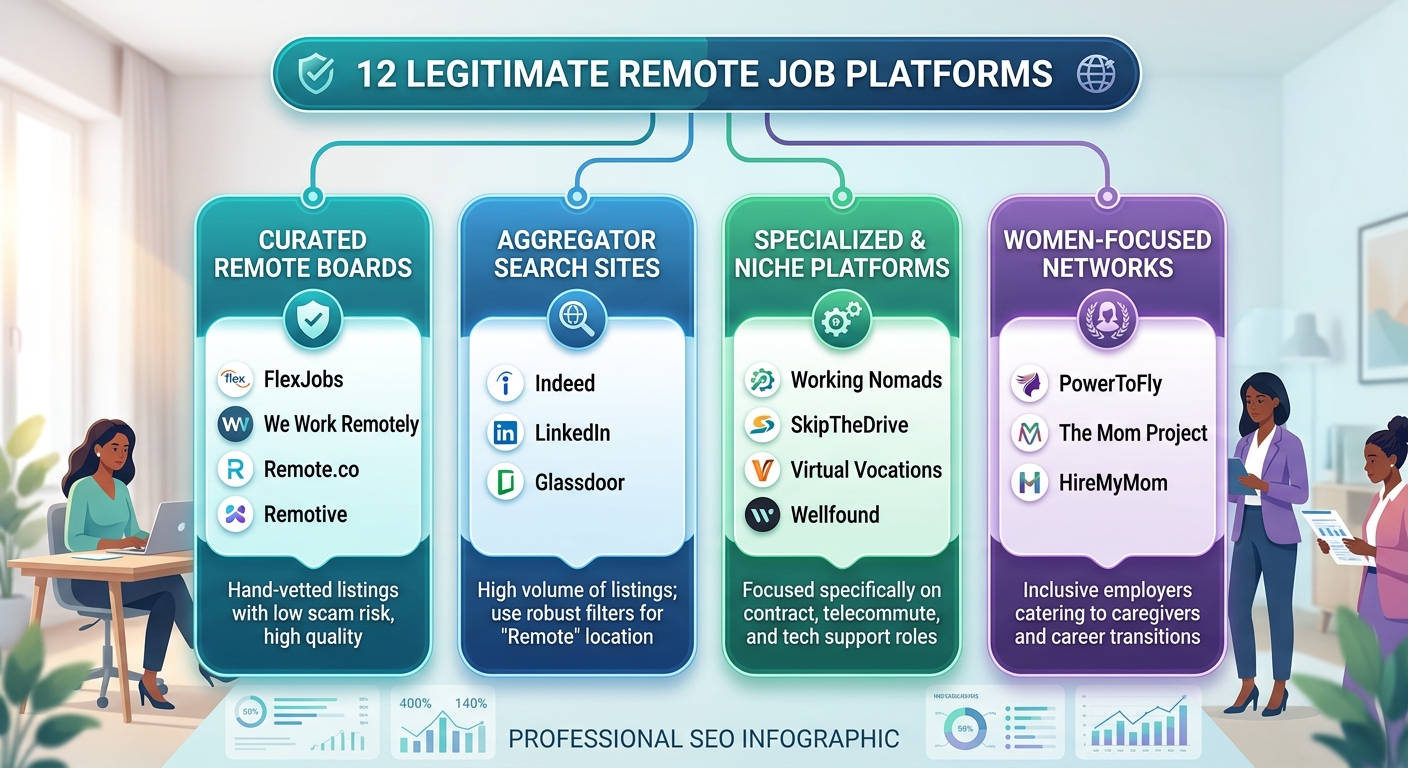
General remote job boards (FlexJobs, We Work Remotely, Remote.co, Remotive)
These platforms specialize exclusively in flexible and telecommute work, utilizing dedicated human or algorithmic screening to maintain high listing quality:
- 1. FlexJobs: A premium subscription board where every listing is manually vetted by research teams. Ideal for finding legitimate corporate support roles without sifting through spam.
- 2. We Work Remotely (WWR): One of the largest remote communities globally, boasting high-volume daily listings across Customer Support, Operations, and Live Chat functions.
- 3. Remote.co: Focuses specifically on entry-level, customer care, and administrative support roles, offering curated lists maintained by remote-work experts.
- 4. Remotive: Features a dedicated “Customer Support” tab with active filters for location constraints (e.g., US-only, Americas, or Worldwide coverage).
Traditional job sites with remote filters (Indeed, LinkedIn, Glassdoor)
Mainstream job sites contain millions of listings. Success on these boards depends on using advanced location and title filters:
- 5. Indeed: Use search terms like “Customer Service Representative” and set the location filter specifically to “Remote”. Pay close attention to company reviews before applying.
- 6. LinkedIn: Set job alerts for remote customer care positions. Connecting directly with corporate recruiters on LinkedIn can bypass traditional applicant tracking systems.
- 7. Glassdoor: Offers integrated salary transparent data alongside remote support listings, allowing you to cross-reference pay rates and company culture reviews simultaneously.
Specialized remote platforms (Working Nomads, SkipTheDrive, Virtual Vocations, Wellfound)
Niche engines aggregate remote positions across technical, startup, and contract domains:
- 8. Working Nomads: Sends curated daily or weekly email alerts specifically for remote customer care, account management, and helpdesk vacancies.
- 9. SkipTheDrive: A free resource board that categorizes work-from-home customer support jobs without requiring account registration.
- 10. Virtual Vocations: A family-owned service featuring screened telecommute positions, career guides, and remote-specific company profiles.
Women-Focused Career Networks and Remote Communities
These platforms partner with inclusive employers looking to recruit female talent, parents, and professionals returning to the workforce:
- 11. PowerToFly: Connects women with fast-growing companies committed to diversity and remote inclusion, frequently listing competitive support roles.
- 12. The Mom Project & HireMyMom: Platforms tailored toward mothers and caregivers seeking flexible, vetted customer service roles that respect work-life balance.
How to Create a Remote Customer Service Resume
Your resume is your primary ticket to landing remote interviews. Because hiring managers for work-from-home positions receive hundreds of applications, your resume must immediately highlight remote readiness, clear communication skills, and relevant past experience.

Turning Retail, Hospitality, and Admin Work into Relevant Skills
You do not need prior work-from-home experience to land a remote support role. The key is translating daily face-to-face or administrative tasks into digital customer service terminology:
- Retail Sales & Cashier Work: Translate in-person checkout and product recommendations into “high-volume inquiry management, de-escalation, and product guidance.”
- Hospitality & Food Service: Translate order taking and table management into “multitasking under peak volume, active listening, and conflict resolution.”
- Reception & Administrative Work: Translate answering phones and scheduling into “multichannel communication, database entry, CRM tracking, and ticket escalation.”
Using Action Verbs and Measurable Metrics on Your Resume
Generic bullet points like “Handled customer complaints” fail to stand out. Start every bullet with a strong action verb and quantify your results with metrics whenever possible:
- Before: Responsible for answering customer emails and calls.
- After: Resolved 60+ daily inbound customer inquiries via email and chat while maintaining a 98% positive satisfaction rating (CSAT).
- Before: Dealt with angry customers at the front desk.
- After: De-escalated complex billing disputes and reduced customer churn by 15% through empathetic, solution-oriented communication.
Optimizing Your Resume for ATS Screening Software
Most companies use Applicant Tracking Systems (ATS) to filter resumes before a human recruiter reads them. Follow these formatting rules to ensure your application passes automated scans:
- Use Standard Heading Titles: Stick to recognized headers like “Work Experience,” “Skills,” and “Education” rather than creative alternatives like “My Journey.”
- Incorporate Targeted Keywords: Mirror terms directly from the job description (e.g., Zendesk, ticket queue, SLAs, de-escalation, live chat, cross-functional collaboration).
- Keep Formatting Clean: Avoid multi-column layouts, graphics, tables, or text boxes, which confuse ATS parser bots. Use a single-column PDF or Word document format.
- Highlight Remote-Specific Competencies: Include a dedicated Remote Work Readiness section listing your typing speed (WPM), internet reliability, and self-management skills.
Writing a High-Impact Remote Cover Letter
While some candidates skip the cover letter, including a concise, targeted letter gives you a competitive edge—especially when transitioning from an offline field:
High-Impact Cover Letter Template:
Subject: Application for Remote Customer Support Specialist – [Your Name]
Dear [Hiring Manager Name or Hiring Team],
With over [Number] years of experience in high-volume [retail/hospitality/administrative] environments, I am excited to apply for the Remote Customer Support Specialist position at [Company Name]. Throughout my career, I have specialized in turning stressful customer interactions into positive brand loyalty through active listening, quick problem-solving, and empathy.
In my previous role at [Previous Employer], I handled [Metric, e.g., 50+ daily interactions], consistently achieving a [Metric, e.g., 95% CSAT score]. I am fully equipped with a quiet dedicated home office, high-speed internet, and hands-on familiarity with tools like [Mention 1–2 software tools, e.g., Zendesk and Slack].
I welcome the opportunity to discuss how my transferable skills and strong work ethic can support [Company Name]’s customer care team.
Sincerely,
[Your Name]
[LinkedIn Profile URL] | [Phone Number] | [Email Address]
How to Apply for Remote Customer Service Jobs Strategically
Applying for work-from-home positions requires a structured approach. Simply submitting hundreds of generic applications yields low response rates. Using targeted search techniques and tailored submissions significantly increases your chances of securing interviews.
Using the Right Search Strings and Filter Combinations
Job board search engines rely on exact keyword matches. Broad searches like “remote jobs” return thousands of irrelevant listings, whereas specific Boolean search operators narrow results to legitimate, high-intent roles:
- Targeted Title Search Strings:
"Remote Customer Support Specialist" OR "Virtual Customer Care Representative""Live Chat Agent" AND "Work from Home""Tier 1 Support" OR "Helpdesk Specialist" AND "Remote"
- Location & Constraint Filters:
Always verify location restrictions. Many “remote” postings require residence within specific time zones or countries (e.g., “US-Only,” “Americas Time Zones,” or “UK/EU” due to legal and tax compliance). - Exclusion Strings to Avoid Noise:
Use the minus operator to filter out commission-only or sales roles:Customer Service Specialist -sales -commission -cold calling.
Tailoring Your Resume and Application for Every Position
Applicant Tracking Systems (ATS) compare your application directly against the job description. Taking 5–10 minutes to customize each submission dramatically improves your match score:
- Match Key Terminology: If the posting mentions “ticketing management,” use that exact phrase on your resume instead of generic terms like “answering emails.”
- Align Skills Order: Reorder your skills section so the top 3–4 bullet points reflect the primary requirements listed in the first paragraph of the job ad.
- Answer Application Questions Thoughtfully: Many remote employers include custom screening questions (e.g., “How do you handle a frustrated customer?”). Write clear, multi-sentence answers using real-world examples rather than one-word responses.
Quality Over Quantity: Building a Targeted Application Pipeline
Submitting 5 deeply tailored, high-fit applications per week yields a higher response rate than blasting 50 generic resumes.
| Strategy | Generic Volume Approach | Targeted Quality Approach |
|---|---|---|
| Weekly Submissions | 50+ applications | 8–12 applications |
| Time Spent Per App | 2–3 minutes | 20–30 minutes |
| Customization | Identical resume & cover letter | Tailored keywords & custom screening answers |
| Recruiter Outreach | None | Direct message to hiring manager on LinkedIn |
| Typical Response Rate | 1% – 2% | 15% – 25% |
How to Ace a Remote Customer Service Interview
Landing an interview for a remote customer service role proves your resume hit the mark. However, virtual interviews evaluate more than past experience. Hiring managers want to verify your digital communication skills, tech literacy, home office setup, and ability to handle high-pressure customer situations without direct supervision.
Preparing for Video Interviews and Remote Assessments
A video interview acts as a live demonstration of your daily work environment.
- Audit Your Technical Setup: Face a soft light source (like a window), use a dedicated USB headset with a noise-canceling microphone, and connect directly to your router via Ethernet to prevent latency.
- Master Pre-Employment Assessments: Many employers require typing speed tests (aim for 45+ WPM), simulated chat exercises, and situational judgment screens. Treat automated one-way video screeners like live interviews by looking directly into the camera lens.
Practicing Key Customer Support Questions
Prepare responses for common situational and behavioral prompts:
- De-escalation: “How do you handle a frustrated customer demanding a refund against company policy?”
- Remote Independence: “How do you stay productive during high-volume shifts without an on-site supervisor?”
- Tool Proficiency: “Which CRM or helpdesk platforms (like Zendesk, Salesforce, or Freshdesk) have you used?”
Structuring Answers with the STAR Method
Avoid vague answers by using the STAR Method (Situation, Task, Action, Result):
- Situation: Briefly describe the customer scenario.
- Task: State the issue or challenge you needed to resolve.
- Action: Explain the specific steps you took using empathy and problem-solving.
- Result: Share the positive outcome, ideally backed by data (e.g., “Achieved a 98% CSAT score”).
Highlighting self-discipline, active listening, and metric-driven results proves you are ready to excel in a work-from-home support environment.
How to Spot and Avoid Remote Job Scams
High demand for work-from-home roles makes job seekers a target for online scams. Scammers post fake listings to steal personal information or money. Protecting yourself starts with knowing how to evaluate job offers and verify employers.
Red Flags: Upfront Fees, Wire Transfers, and Paid Training Scams
Legitimate employers pay you—never pay to get hired. Watch out for these common remote job scams:
- Equipment Check Scams: Scammers send a fake check to buy office supplies from a specific vendor. The check bounces, leaving you liable for the spent money.
- Paid Training Fees: Any company requiring upfront payment for background checks, training materials, or software access is fraudulent.
- Overpayment Transfers: Scammers send an intentional overpayment for your first paycheck and request a refund via wire transfer, Zelle, or crypto.
Verifying Company Domain Legitimacy and Recruiter Profiles
Take three minutes to run this quick verification check before sharing sensitive details:
- Check Email Domains: Real recruiters email from official corporate addresses (
name@company.com), not free accounts like Gmail or lookalike domains (@company-jobs.com). - Cross-Reference on LinkedIn: Look up the recruiter on LinkedIn to confirm they actually work for the company.
- Verify on Official Sites: Make sure the job appears on the company’s official careers page, not just third-party boards.
Protecting Yourself on Messaging Apps
Scammers often operate on end-to-end encrypted apps to avoid detection.
- Red Flag Warning: If a recruiter insists on interviewing strictly via Telegram, WhatsApp, or text chat, stop communication immediately. Legitimate remote companies use secure video platforms like Zoom or Microsoft Teams.
Never share your Social Security number, banking details, or ID copies until you have verified the employer through an official onboarding portal. If an offer feels rushed or too good to be true, walk away.
How to Succeed in a Work-from-Home Customer Service Role
Transitioning to a remote support role is only the first step. Long-term success requires self-discipline, proactive communication, and intentional career planning to ensure you remain visible to leadership while working from your home.
Setting Clear Boundaries Between Work and Family Life
When your home becomes your office, the line between professional and personal time blurs. Without physical boundaries, household interruptions can negatively impact your call handle times and overall performance metrics.
- Establish a Dedicated Workspace: You do not need a massive home office, but you do need a designated, distraction-free zone. Working from a specific desk signals to your brain—and your family—that you are on the clock.
- Communicate a “Do Not Disturb” Policy: Share your exact shift schedule with your household. Use visual cues, like a closed door or wearing your headset, to indicate when you are speaking with live customers.
- Log Off Completely: When your shift ends, shut down your computer. Continuing to check support tickets on your phone trains your employer and yourself that you are always available, eroding your work-life balance.
Preventing Remote Burnout and Maintaining High Performance
Customer service can be emotionally taxing. Dealing with frustrated customers in isolation, without coworkers nearby to vent to, accelerates burnout.
- Schedule Forced Movement: Break your shift into focused work sprints followed by mandatory breaks. Stepping away from your screen for just five minutes to stretch resets your posture and patience.
- Control the Controllables: You cannot control a caller’s mood, but you can control your breathing, your script readiness, and your tone. Master de-escalation by actively listening instead of immediately reacting.
- Protect Your Mental Space: Empathy is required for support roles, but absorbing a customer’s anger is not. Once a difficult interaction is over, take a deep breath and leave the stress in the chat window.
Building Skills for Career Advancement Into Management
Remote workers often face the “out of sight, out of mind” trap. To get promoted to a Tier-2 specialist, Team Lead, or Quality Assurance manager, you must actively self-advocate.
- Master the Tech Stack: Go beyond answering basic tickets. Learn the reporting and analytics features of your CRM (like Zendesk or Salesforce) to understand the data behind the queue.
- Share Knowledge and Mentor: Step up in team chat channels. Answering questions from new hires or sharing a template that improved your resolution time proves you are ready for a leadership role.
- Drive Your Own Performance Reviews: Do not wait for an annual evaluation. Request brief, monthly 1-on-1 check-ins with your manager to present your logged achievements and ask for growth-oriented feedback.
Frequently Asked Questions (FAQ)
Can women with no prior experience get remote customer service jobs?
Yes, women entering or returning to the workforce without direct support experience can land entry-level remote customer service jobs. Employers prioritize strong communication, empathy, active listening, and problem-solving skills over formal helpdesk backgrounds. Experiences gained in retail, hospitality, administrative management, teaching, or caregiving translate directly into customer-facing remote roles.
How much do work-from-home customer service jobs pay?
Compensation typically starts between $15 and $19 per hour for entry-level call center and general support roles. Specialized positions like live chat agents, email support representatives, and bilingual specialists usually command between $17 and $22 per hour. Technical support, Tier-2 specialists, and team lead positions can pay $22 to $30 or more per hour, often supplemented by performance bonuses, shift differentials, and benefits packages.
What equipment do I need to work in customer service from home?
You need a reliable desktop or laptop computer running an updated operating system with at least 8GB of RAM, paired with a dedicated USB headset featuring a noise-canceling microphone. Employers generally require a high-speed internet connection offering at least 25 Mbps download speed connected via an Ethernet cable, along with a quiet, dedicated workspace free from background noise. Enterprise employers frequently provide and ship company-owned hardware directly to full-time remote employees upon hire.
How can I verify if a remote customer service job is legitimate?
Always cross-reference job postings on the official corporate careers page of the hiring company and verify that recruiter emails come from an official company domain rather than free providers like Gmail or Yahoo. Legitimate employers will never ask for money, require upfront fees for equipment or training, or insist on conducting interviews exclusively through text-based messaging apps such as Telegram or WhatsApp.
What are the best websites for finding legitimate remote jobs?
Dedicated remote-first job sites such as FlexJobs, We Work Remotely, Remote.co, Remotive, and SkipTheDrive offer screened listings specifically curated for remote professionals. Major platforms like LinkedIn, Indeed, and Glassdoor are also effective when filtered for work-from-home positions, provided you apply directly on the hiring company’s official career page.
Your Next Steps to Land a Remote Customer Service Job
Landing a legitimate work-from-home position comes down to targeted action, strategic application, and patience. Follow this simple checklist to kickstart your search today:
- Update Your Resume for Remote Roles: Highlight transferable soft skills like active listening, empathy, and problem-solving, along with any relevant CRM, chat, or admin experience.
- Set Up Profiles on 2–3 Reliable Job Boards: Start with trusted platforms like FlexJobs, We Work Remotely, or LinkedIn using targeted search filters for customer support positions.
- Tailor Each Application: Align your resume and cover letter with the specific job description instead of submitting dozens of generic applications.
- Prepare Your Physical and Digital Workspace: Ensure your computer, high-speed internet, noise-canceling headset, and lighting are ready for video interviews and remote assessments.
- Verify Every Opportunity: Double-check company domains and career pages to protect your time, energy, and personal information from online scams.
Take the first step today by tailoring your resume—your ideal remote career is well within reach.
By Aveline Lowell
Founder & Editor-in-Chief, RiseByHer
Aveline Lowell writes research-driven content covering women’s finance, entrepreneurship, STEM, technology, and career growth. Her work focuses on practical, well-researched information that helps women make informed decisions.
Editorial & Disclaimer: RiseByHer aims to provide accurate, well-researched, and up-to-date information. Articles are reviewed and updated when necessary and are intended for general informational and educational purposes, not personalized financial, legal, tax, or professional advice.